
A closed PM shows that an order was closed, not which steps happened or who did them. To verify PM work, record who completed each step and when, enforce the sequence where it matters, and capture evidence for risky steps, such as a torque reading or a gauge photo. Start by checking 10 closed PMs from the last 30 days on your most critical asset, and mark every step no one can prove.
We talk with a lot of manufacturers, and the same challenges keep coming up. One is a standoff you have probably refereed yourself. Production says the downtime is a maintenance problem. Maintenance says it's a process problem. Everybody has a point, and nobody has the data to settle it.
Work orders show part of the story. They log when an order opened and closed, and what was repaired. The slow part usually happens outside the record: the time before anyone reported the problem, and the steps between the first and last. In several plants we spoke with, the operator side of the clock ran longer than the repair itself.
A closed PM has the same blind spot. It tells you the order closed. It tells you very little about what happened in between. Below, I'll cover why this happens, how to test whether your plant has the same gap, and how to start closing it without waiting on an ERP or CMMS project.

How much of downtime do work orders miss?
Work orders capture the repair, and they stop there. Production and maintenance often argue over the same stoppage because neither side can see the other's part of it. Measuring the full stretch, including the wait before the report, usually changes the conversation.
Start with the preventive maintenance compliance number. It's probably in the nineties. It likely shows a completed status and a date, and not much else. Whether the coupling got checked, which grease went into which point, and whether lockout happened in order are not in the record. Orders close on time, and later someone finds a skipped step, missing material or a workaround nobody wrote down.
Say the report reads 95%. The true number is probably lower, but you can't tell by how much. If you've defended that number in a review and then watched a machine with a clean PM history fail, you know the frustration.
What does a CMMS record about PM work, and what does it miss?
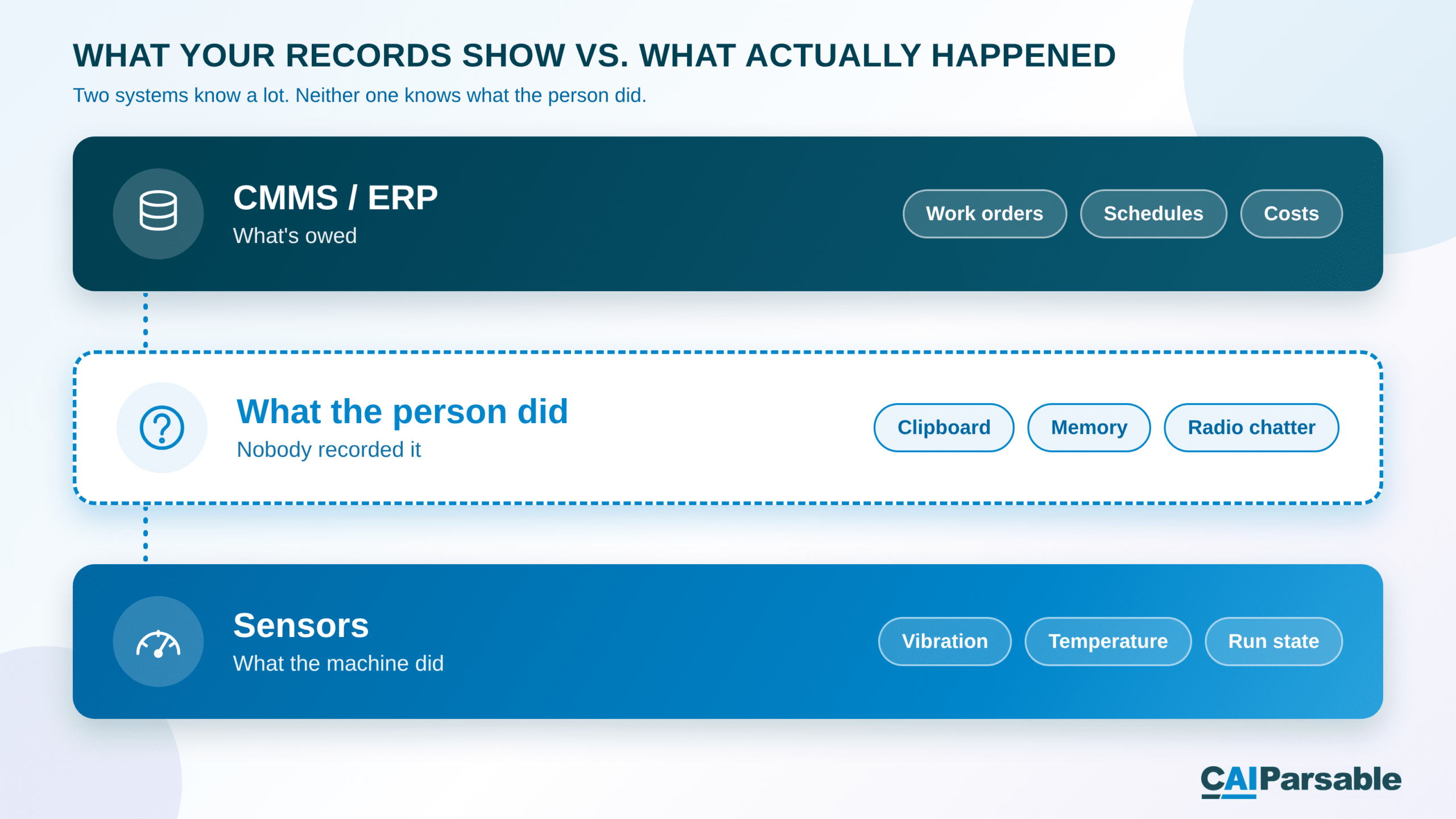
Your CMMS and ERP do a few things well. They tell people what needs doing and when. They record what got closed. Sensors, if you have them, show what the machine did. The ERP covers the money and the orders.
None of those systems records what the person at the machine did. That gap usually gets handled on a clipboard or from memory.
Why do PM steps get skipped, and does more paperwork help?
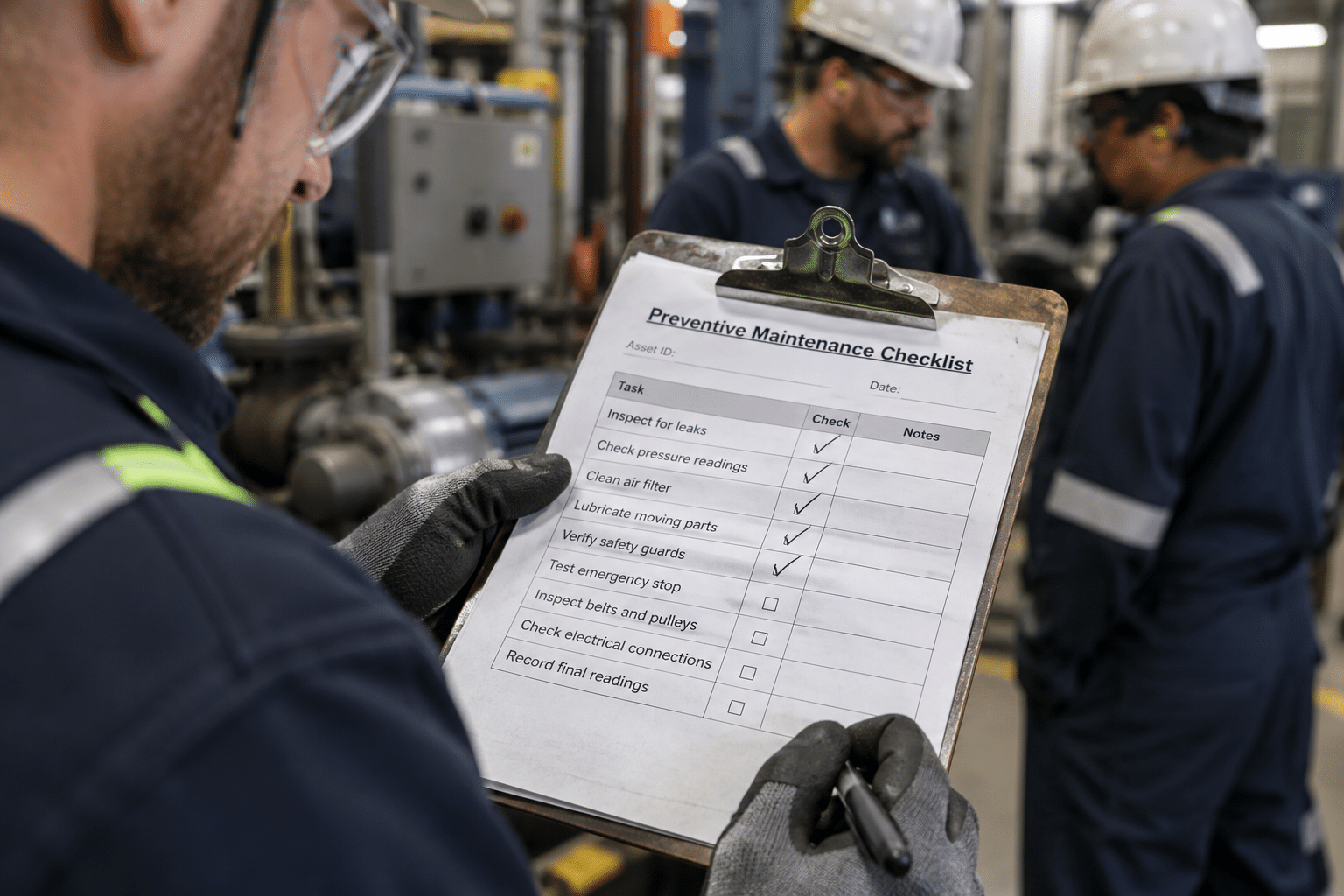
Nobody skips a step on purpose. The shift's PM list is longer than the shift, or the procedure lives on a laminated card two revisions behind. Equipment that gets a PM only a couple of times a year is the worst case, because the technician works from memory, and memory is a poor place to keep a torque value.
Paper procedures have the same problem. Someone splits the pages, and several people work a sequence that must happen in order. Anything said aloud and never written down is lost.
Scale makes it harder. One OEM manual can list close to 300 preventive tasks for a single machine. We saw that at a brewery getting ready to commission. A spreadsheet of 300 line items tells people what exists. It doesn't tell them what got done.
The usual reflex is more paperwork: a longer checklist, another signature line, a Friday sign-off. A longer checklist gets completed faster and checked less. A Friday sign-off checks the paper, not the work. What helps is making the right step the easy one and making a skipped step visible.
What should sit between a work order and the technician?
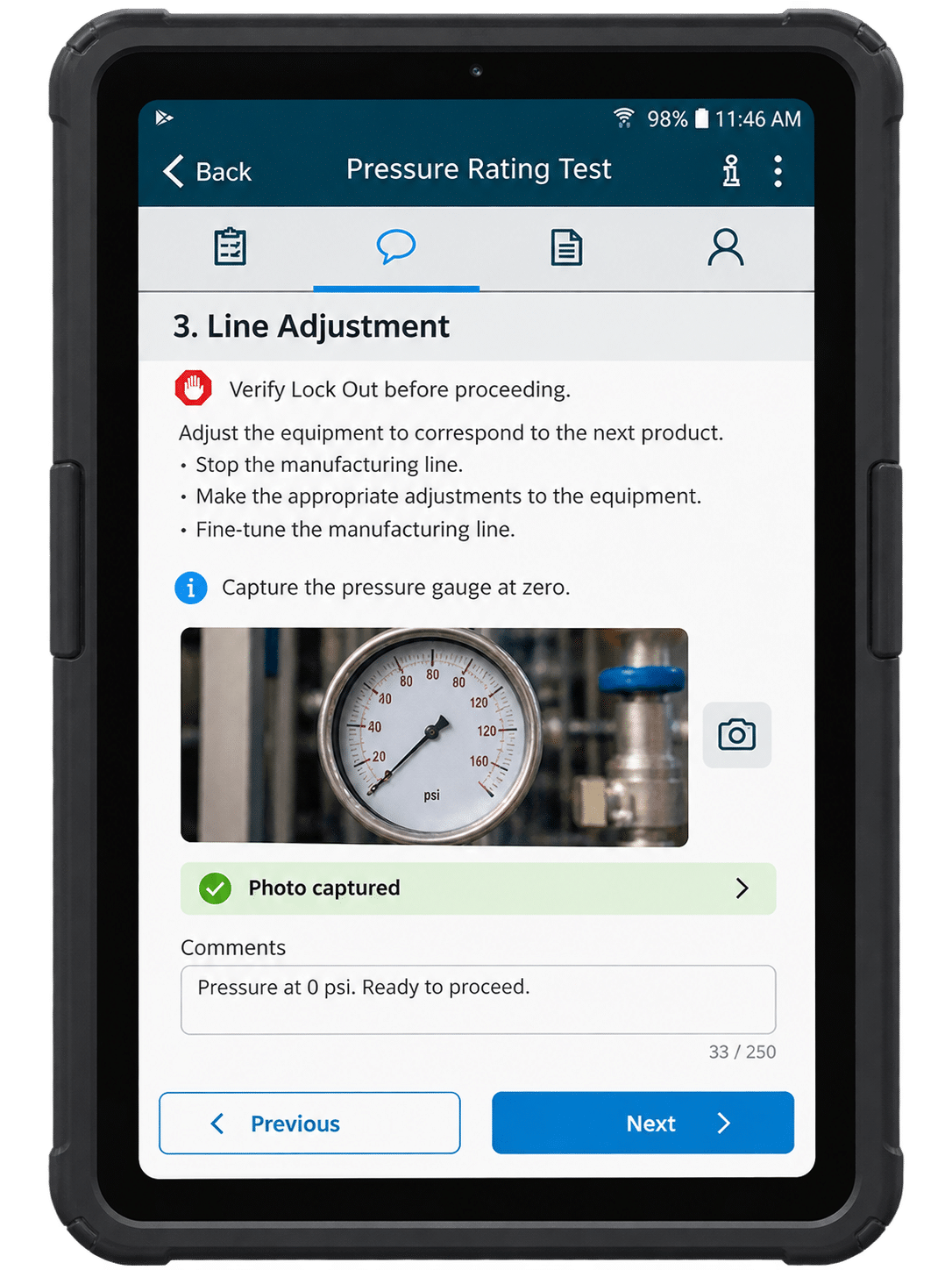
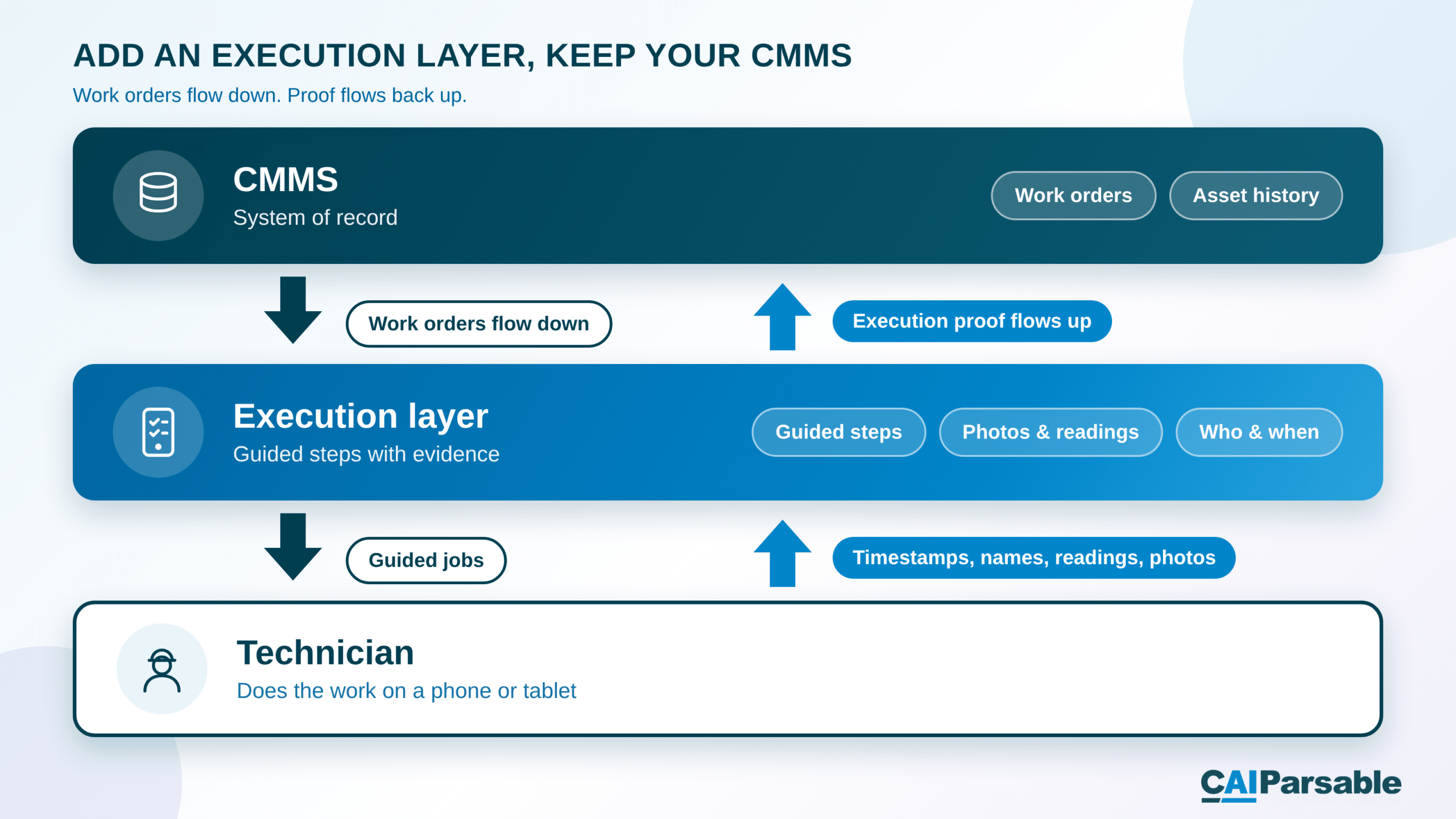
Keep the CMMS as the system of record. Put a layer in front of the technician that turns each work order into guided steps on a phone or tablet. At the steps that carry risk, require evidence: confirm the right component, capture a torque reading, or photograph the pressure gauge at zero before anyone opens the line.
Parsable is a connected worker platform built for this. The camera opens directly, so last week's photo can't stand in for today's reading. A reading outside your range shows on the screen right away. A supervisor can then be notified, or a follow-up work order raised through an API. Steps can be restricted by role, and order can be enforced where sequence matters, such as lockout.
Every step carries a timestamp and the name of the person who completed it. The order closes with that data behind it. Your reviews change. You look at which steps get skipped most, which PMs run long, and where one technician takes an hour for work another finishes in thirty minutes.
Two side benefits people don't expect. Conversations about the work stop living on the radio or in someone's inbox, because a message sent from the job stays attached to the job. And a newer technician can ask a more experienced one from inside the job, with a photo.
Before you build a single step, decide who acts on each piece of evidence. A torque reading nobody reviews is just extra typing. One manufacturing leader we spoke with said that's where his team struggles most.
Parsable doesn't replace your CMMS or manage spare parts inventory. Early on, a form takes longer than a scribbled checkbox, and someone will want their paper back. A bad procedure digitized is still a bad procedure, now with timestamps. If your maintenance execution is already digital and captures evidence at each step, start with quality checks, safety observations or training instead.
How do you test whether your PMs were really done?
Run a small test on your own records first. It takes about an hour.
- Pull 10 closed PMs on your most critical asset from the last 30 days.
- For each one, ask whether anyone can show which steps happened, in what order, and who did them.
- Circle every step that exists only in a technician's head.
- Find your last unplanned stop on that asset. What did the PM history say the week before?
If more than three of the 10 come back as "we think so," you've found the gap. Don't hold that against your technicians. Nobody ever asked the system to vouch for the work.
Do you need a new CMMS to verify PM steps?
No. Many plants are married to their CMMS, whether that's Maximo, SAP PM or something else, and that's fine. You don't need to replace it to fix a step-compliance problem. Plants that are mid-migration or still evaluating often wait a year for frontline tools, because building on a system that's about to change feels risky. That wait is frustrating when you already know what's wrong.
Start smaller than you think you should. Take the five or six PMs on your most critical asset, build them as guided jobs, and run them alongside what you do today. When your system is ready, work orders flow down and execution proof flows back up. If the system exposes an API, connecting later is a conversation with IT, not a rebuild.
If you run more than one plant, let the plant with the problem design the process first, then copy it to the next. Expect some double entry in the meantime. It's annoying, and it's temporary.
Frequently asked questions
How do you verify a preventive maintenance task was actually done?
Check each step, not just the order status. Confirm who completed each step, when they did it and in what order. For risky steps, such as lockout or torque checks, require evidence: a timestamped reading, a photo of a gauge or a confirmed component. Then sample recent closed PMs and mark any step that exists only in someone's memory.
Is a closed PM work order proof that the work was done?
No. A closed work order shows that someone marked it complete, with a date and a status. It does not show which steps happened, in what order or who did them. Compliance can look high while steps are skipped, so pair the order record with step-level data or evidence for the steps that matter most.
What is preventive maintenance compliance, and why can it mislead?
Preventive maintenance compliance is the share of scheduled PMs closed on time. It can mislead because a PM can close with skipped steps, missing material or an undocumented workaround. A 95% compliance rate shows that orders closed, not that the machine was properly serviced. Check the steps behind the number before you trust it.
Do you need a new CMMS to verify PM steps?
No. Keep your CMMS as the system of record and add a guided execution layer for technicians. Start with the five or six PMs on your most critical asset and run them alongside your current process. Connect the two later through the CMMS's API, if it has one. You don't need to replace the CMMS to start.
How many PM records should you audit to test your data?
Start with 10 closed PMs from the last 30 days on your most critical asset. For each one, check whether someone can show which steps happened, in what order and who did them. If more than three come back as 'we think so,' your records are not proving the work. The check takes about an hour.
Decision framework: which steps need evidence?
Check each PM step in three steps:
- Is the step safety-critical or hard to undo? Examples: lockout, torque, pressure checks. Require evidence: a timestamped reading or photo, and a named person.
- Is the step routine and quick to confirm? A timestamped checkbox with a named person is enough.
- Did the PM close without a named person, timestamps or evidence for its critical steps? Mark it unverified and review it before you count it as complete.
Every closed PM should pass step 3. Only steps that pass step 1 need photos or readings.
If you'd like to see what this looks like on one of your own assets, request a Parsable demo or talk with our team. Bring those 10 PMs, and we'll walk through one of them as a guided job.